Playbook
Best Shopify Apps: What They Cost You
A store your size runs fifteen to thirty apps and the owner names about eight. Here is which categories earn their place, and how to audit the rest.
A store your size runs fifteen to thirty apps and the owner names about eight. Here is which categories earn their place, and how to audit the rest.
Open your Shopify admin and count the apps. A store doing a few million a year usually runs between fifteen and thirty of them, at four to six hundred dollars a month, and the owner names about eight. Searching "best Shopify apps" will hand you another fifty to add. The more useful question is which of the thirty you already pay for is earning anything.
The rest are the residue of campaigns that ended. A quiz app from a launch in March. Two review apps, because someone switched and never uninstalled the first. A popup tool that a different popup tool replaced.
Every one of them charges you monthly, and most of them load code on every page a customer opens. So this covers which categories earn their place, what each one costs beyond the subscription, and how to find the ones costing you nothing back.
Four of them do real work at this size, and they are worth paying for.
Email and SMS. The highest-return category, because it sells to people who already know you. This is where flows live, and we have written the build order for Klaviyo flows separately.
Reviews and photos. Social proof on the product page, and a feed of real customer language to put back into the copy. It also feeds the roundups and comparison pages that AI answers read.
Customer support. One inbox for email, chat and social. Worth it once support volume passes what one person handles between other jobs.
Subscriptions, if you sell something people rebuy on a schedule. Consumables, refills, replenishable goods. Otherwise it is a monthly fee for a checkout option nobody picks.
Everything else is situational. Upsell tools, loyalty programmes, quizzes, bundlers, back-in-stock alerts, currency switchers and page builders each have stores where they pay for themselves and stores where they are dead weight. The difference is your catalogue rather than the app.
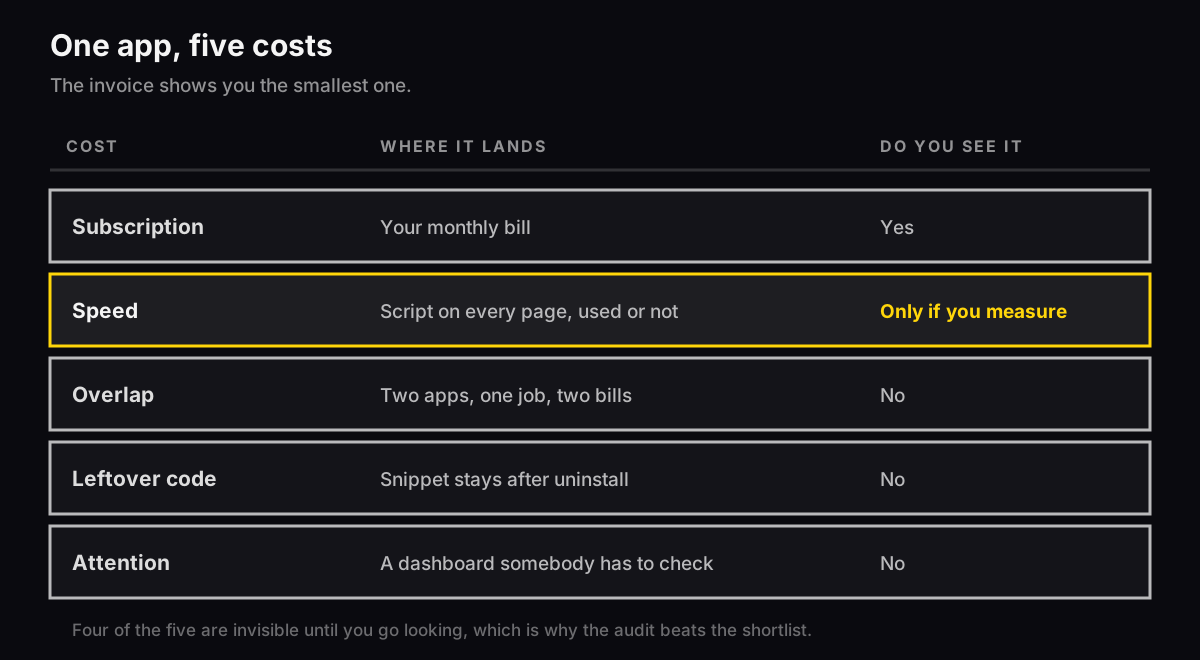
The monthly fee is the part you see. Four other costs are real and none of them appear on the invoice.
Speed. An app that touches the storefront loads its JavaScript on every page, whether or not that page uses it. A quiz app installed for one campaign still loads on every product page two years later. Speed is the one cost you measure directly, and there is a way to see which app is doing it.
Overlap. Two apps doing the same job is common and hard to spot, because each was installed by a different person solving a different problem in a different month. Popups and email capture are the usual pair.
Leftover code. Uninstalling does not always remove the snippet. Plenty of apps leave code in your theme, so you keep the load and lose the feature.
Attention. Every app is a dashboard somebody checks, a setting that drifts, and an integration that breaks without telling you when something upstream changes.
Three questions, and an app needs a yes to all three.
What does it replace? If nothing, you are adding rather than swapping, and the total goes up. Sometimes that is right. Notice when you are doing it.
What number does it move? Not a feature, a number. Revenue per visitor, repeat rate, support tickets closed. If nobody names the number now, nobody will be able to say later whether it worked.
Who checks it in ninety days? An app with no owner becomes residue. Put a name and a date on it the day you install it.
Install one at a time, with a fortnight between. Two at once and you learn nothing about either.
This is the part the lists skip, and at most stores it returns more than anything you would add.
Open the app list in your admin and sort every app into three piles. Earning, where you name the number it moves. Situational, where it does something real but you would not install it again today. Residue, everything installed for a reason that has passed.
Uninstall the residue. That is usually a third of the list and several hundred dollars a year.
Then check the theme for what they left behind. Search theme.liquid for the app's name and remove any snippet still sitting there. A request that outlives the app is the worst version of this, because you keep the cost and lose the feature.
Give the situational pile a date rather than a verdict. Ninety days, then decide again with numbers.
Two reasons, and both are about you rather than modesty.
Rankings date fast. App pricing, features and quality change quarterly, and a list written last year recommends things that have since been acquired, repriced or abandoned.
And most lists on this subject are published by companies that sell an app. That is easy to check for yourself. Open any "best Shopify apps" article, look at who published it, then look for their own product in the list. It is usually there, usually near the top, and usually in a category shaped to hold it.
The categories above are stable. Which vendor wins inside a category is a question to answer the week you buy, with a trial, against your own catalogue.
Count your apps and add up the monthly cost. Most owners are surprised by the total, and the number does half the work on its own.
Sort them into earning, situational and residue. Uninstall the residue, then search theme.liquid for anything they left behind.
Do that before you install anything new. Subtraction is faster, it is free, and it usually helps the store more.
If you would like a second read on your stack, we run a free teardown and send it back in two business days. Our ecommerce SEO service covers the technical side, and if the apps you are auditing are email tools, the Klaviyo flows guide covers which of those earn their keep.
There is no right number, and chasing one leads you to uninstall something that works. The number that matters is how many you name a reason for. If you run twenty-four and account for nine, the audit is worth more than any new install. Most stores land between eight and fifteen once the residue goes.
Most of them do, by a little, and the total adds up. An app that touches the storefront loads its JavaScript on every page, whether or not that page uses it. A quiz app from a campaign in March still loads on every product page in December. Measure it rather than guessing: run the store through PageSpeed Insights, then open the Chrome DevTools coverage report to see which scripts load unused.